• Home
  • Download
  • Purchase
  • Help Center
  • Support


Basic operations

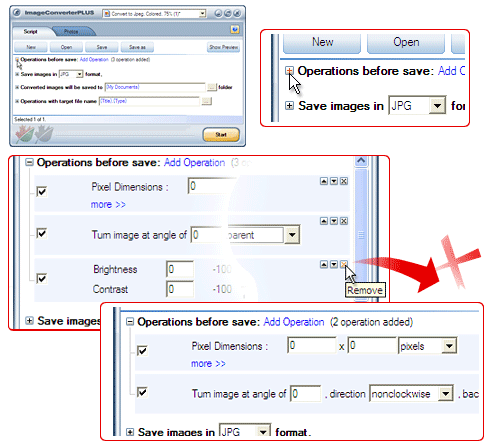
This section contains information on all operations which can be applied when converting files from one format to another. Note that you can also use the Script tab to apply various graphics effects together with added operations.

About operations
Operations order
Crop image, image cropping, photo cropper / Image Converter Plus
Image color effect / Image Converter Plus
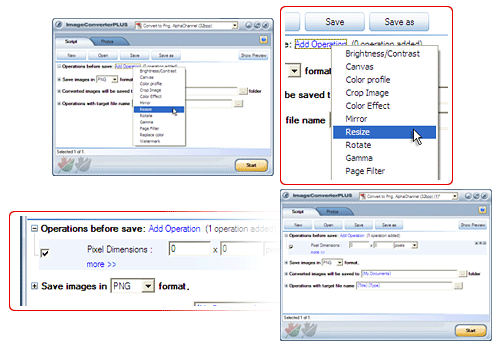
Image Converter Plus - how to resize image, easy image resizer, resize pictures, photo resizer
How to rotate image / Image Converter Plus
Replace color
Mirror image / Image Converter Plus
Canvas
Color profile
Page filter
Watermark
Resize step by step
Image Converter Plus meta tag field

  • Home
  • Download
  • Purchase
    • Update
    • Activation form
  • Support
  • Help Center
    • About features
      • User Interface
      • Right-click menu
      • Supported formats
      • Supported effects
      • Image Converter Plus 8.0 features
    • Work with program
      • First installation
      • First conversion
      • Basic operations

      • Type operations
      • Examples
    • FAQ
      • Download question
      • Purchase question
      • Activation question
      • Update question
      • "How to...?" questions
      • "Can I...?" questions
    • Articles
    • Solutions
      • Copyright protection
      • Enhancing image quality
      • Creating organized image collections
      • Correcting images
      • Processing images
      • Graphics formats and how to change them
      • Working with animated images
      • Miscellaneous
      • Image Converter Plus 8.0 new features
    • Help with help
© 2010, fCoder Group, Inc. All rights reserved.
About Company | Privacy Policy | Site Map | News Archive | Online Help | Geotag Security | Rss news